Blackboard Ally
Fix Your Content Day

On November 10, UTMB will join institutions worldwide for Fix Your Content Day 2026, hosted by Blackboard. This 24-hour competition is part of our ongoing commitment to inclusive education.
Together, we’ll aim to fix as many accessibility issues and course files as possible using the Blackboard Ally tool. Every fix, big or small, contributes to a more inclusive learning environment for all students.
How you can help:
- Review your courses for red and orange indicators
- Focus on quick wins like adding image descriptions or improving Microsoft Word documents
- Start fixing on November 10 and keep things going throughout the day
- Aim for 100%, but improvement is what counts!
Join our "Fix-a-Thon" Event
Looking for help to improve your Blackboard Ally scores? Participate in our Fix-a-Thon event on November 10 and work directly with Academic Computing to resolve accessibility issues, improve course materials, and learn practical accessibility techniques. Every improvement counts toward creating a more inclusive learning environment for all learners.
Event Details
- Date: November 10, 2026
- Time: 12:00 am - 2:00 pm
For more information on how to fix files using Anthology Ally, check out our help guides below.
What counts as a “fix?”
A "fix" occurs when the accessibility score of a file is improved through Blackboard Ally. This could include adding a description to an image directly through Ally or uploading a fixed file through the Ally
Instructor Feedback panel that results in an improved score. A file does not have to reach 100% accessibility to be counted as a "fix". Each "fix" is recorded in the Blackboard Ally database and will be
reported in a live leaderboard. Also, all fixes made using the Instructor Feedback for WYSIWYG will contribute to the total number of fixes for our institution.
How will fixes to content be tracked?
The Blackboard team will track fixes in real time, and you can check your fixes through the usage report in your Ally Institutional Report. Remember, fixes need to happen through the Blackboard Ally User
Interface directly to be counted in the contest. Replacing a file through the LMS can't be reliably tracked and, therefore, won't count in our total fixes.
UTMB's Going Green initiative
UTMB encourages faculty and course administrators to work toward achieving Green accessibility scores within Blackboard Ally whenever possible. In Ally, Green scores represent content with fewer accessibility barriers and serve as the recommended target range for course materials.
- 🟢 Green (67-100%): Fewer accessibility issues
- 🟡 Yellow (34-66%): Moderate accessibility issues
- 🔴 Red (0-33%): Significant accessibility issues
Going Green is not about perfection. It is about continuous improvement. Small changes such as replacing scanned PDFs, adding image descriptions, improving heading structure, and reviewing color contrast can significantly improve accessibility while enhancing the overall quality of course materials.
Blackboard Ally and Accessibility at UTMB
At UTMB, accessibility is a shared responsibility that helps ensure all learners can access course materials regardless of ability, device, or learning preference.
Blackboard Ally supports this effort by helping faculty identify accessibility barriers, generate alternative formats, and improve the usability of course materials over time. Integrated directly into Blackboard Ultra, Ally provides actionable guidance that helps instructors make meaningful accessibility improvements without requiring extensive technical expertise.
As UTMB continues its transition to Blackboard Ultra and works toward evolving digital accessibility expectations under ADA Title II, Ally provides a practical framework for improving accessibility while supporting student success.
Where to Start
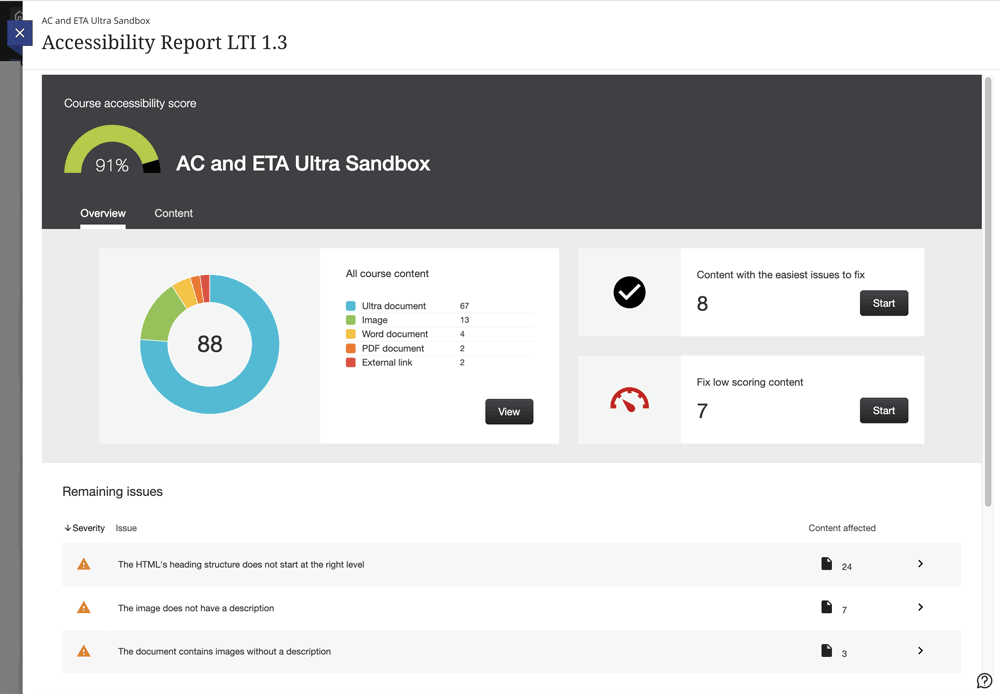
Faculty should begin with the course's Accessibility Report LTI 1.3 within Blackboard. The report helps identify common accessibility issues, prioritize remediation efforts, and track progress over time.
To access the Accessibility Report LTI 1.3.
- Go to Books & Tools in the course (located in the right-side navigation panel)
- Select Accessibility Report LTI 1.3
Recommended starting points include:
- Replacing scanned PDFs with searchable documents
- Adding alternative text to meaningful images
- Using proper heading structures
- Reviewing color contrast in presentations and documents
These improvements often have the greatest impact on accessibility and are among the easiest issues to address.
Faculty Resources
The following resources are recommended for instructors who would like to learn more about Blackboard Ally and accessible course design.
Blackboard Ally Help Guide for Faculty
The Blackboard Ally Help Guide explains accessibility scores, alternative formats, Course Accessibility Reports, and common accessibility issues. It also provides practical recommendations for improving accessibility within Blackboard Ultra courses and serves as the recommended starting point for most instructors.
Download: Blackboard Ally Help Guide
Blackboard Ally Institutional Report Guide
Designed for department administrators, program administrators, course administrators, and Blackboard power users, the Blackboard Ally Institutional Report Guide explains how to use the Ally Institutional Report to monitor accessibility trends across schools, departments, and programs. Topics include Directory Reporting, Courses Reporting, Overview Reporting, Usage Reporting, accessibility metrics, and recommended reporting workflows.
Download: Blackboard Ally Institutional Report Guide
Accessibility Resources and Tools
Faculty interested in learning more about accessible course design, accessibility testing, remediation strategies, and digital accessibility standards may find the following resources helpful.
UTMB Resources
Blackboard Ally Resources
Accessibility Standards and Tools