What is Two-factor Authentication

With DUO Security

How it Works

UTMB requires multi-factor authentication when logging in from off-network. When you are off-network and log into UTMB's VPN, Citrix, or Office 365, you will receive a Duo Mobile login request  (via push notification) on your mobile device. All you need to do is tap Approve, and we'll know it's you.
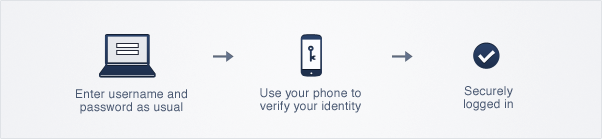
Graphic listing the steps: enter username and password, use your phone to verify your identity, securely loged in

No mobile phone? You can also use a landline or tablet, or ask your administrator for a hardware token. Duo lets you link multiple devices to your account, so you can use your mobile phone and a landline, a landline and a hardware token, two different mobile devices, etc.

Important:  Do not Approve unexpected duo requests.

Frequently Asked Questions (FAQ)

  • Why Do I Need This?
    Passwords are increasingly easy to compromise. They can often be stolen, guessed, or hacked — you might not even know someone is accessing your account.

    Two-factor authentication adds a second layer of security to your online accounts. Verifying your identity using a second factor (like your phone or other mobile device) prevents anyone but you from logging in, even if they know your password.

    This second factor of authentication is separate and independent from your username and password — Duo never sees your password.

    Referred to as two-step or two-factor authentication, this process, which uses Duo Security, asks individuals logging in to confirm their identity using a smartphone, via text, or via automated voice calls.
  • How Do I Set It Up?

    Contact the Service Desk directly at 409-772-5200 to start the enrollment process. 
  • Help with Duo is available!

    Please contact the ITS Service Desk for assistance

  • Using Duo with Citrix
  • Using Duo with Outlook Web App